QuickBooks Online runs the books. It does not take the order, price it
for the account, schedule the delivery or chase the invoice. This is what the layer above it
does, one page per step.
OrderInvoicePaymentSync with QuickBooks Online
WEGOTRADE <> QuickBooks Onlinewegotrade.com
WEGOTRADE
Overview
ERP Series, Edition 1. Overview
Your books are fine. Everything before them is manual.
QuickBooks Online runs the financial record and runs it well. It was never
built to take a business-to-business (B2B) order at 6 a.m., price it for that specific account,
schedule its delivery or chase the invoice afterwards. This is the overview of the
WEGOTRADE playbook for food distributors and manufacturers running QuickBooks Online.
The full edition runs to 29 pages, and each step below says where to find it.
Raised from the delivered order or from QuickBooks Online, the same day
03
Payment
Collected on each invoice’s own term
04
Synchronization
Invoices and payments exchanged with QuickBooks Online, both directions
Food distribution is a frequency business. The same accounts reorder several
times a week, so every one of those four steps happens again and again, and anything manual in
them is paid for again and again. That is the argument the full playbook makes with the
arithmetic. This overview makes it in five pages.
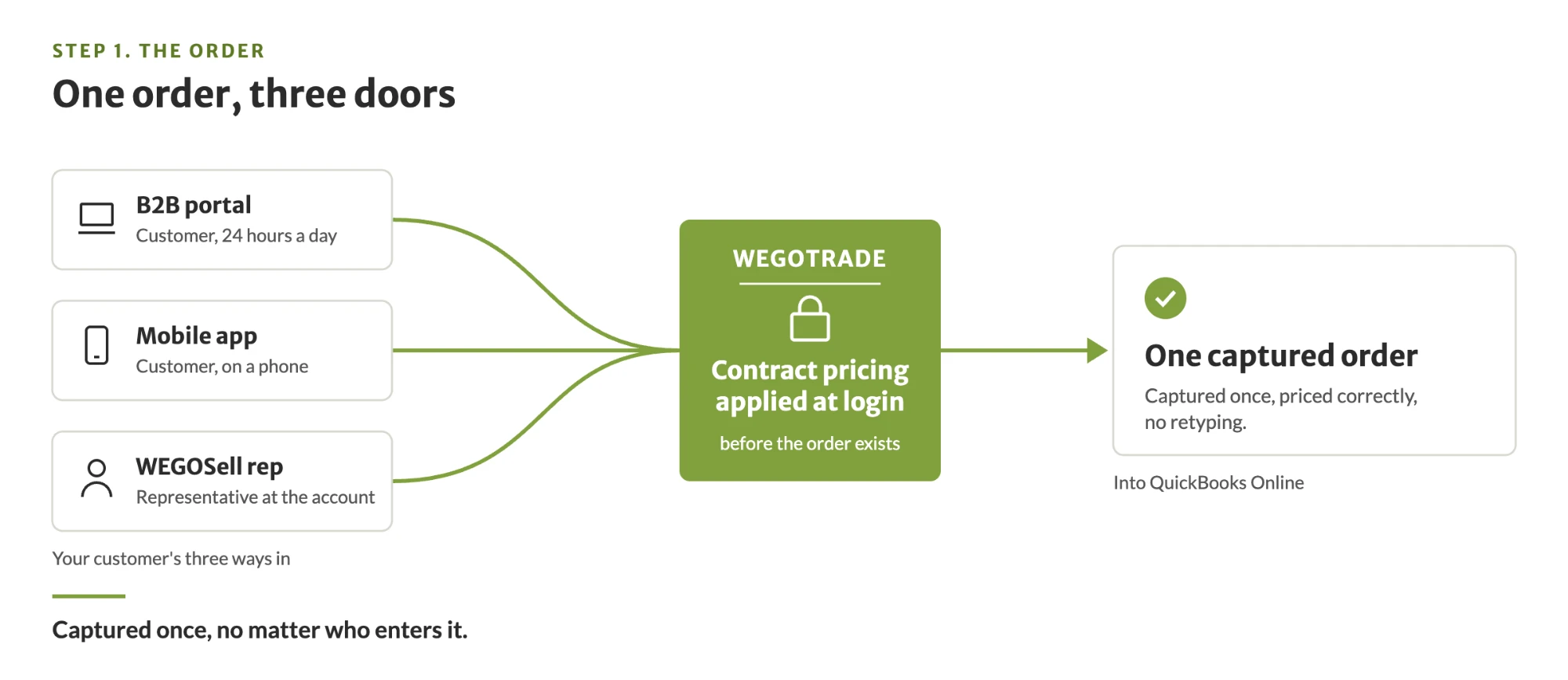
Order capture is the thesis of the whole model. Your B2B customers log in and place their own orders at whatever hour suits their operation, which for a restaurant or a grocer is rarely your office hours.
Manual today
Phone, email, text, or a representative writing it down
Someone retypes it into the accounting system later
Per-account pricing checked by hand, or corrected on the invoice afterwards
Cases, splits and pack configuration resolved in conversation
In the extension layer
Portal or mobile application, 24 hours a day
Contract pricing applied at login, before the order exists
Cases, splits and pack configuration by Universal Product Code (UPC)
Standing orders, one-click reorder and a delivery window the customer chooses
Automatic order generation from those standing orders, one per delivery day, which is what actually automates recurring perishable buying
WEGOSell puts the same catalogue and the same rules in the hands of your representatives
What reaches QuickBooks Online
The order is captured once in WEGOTRADE, priced correctly, with no retyping. Depending on your process, orders can be integrated to QuickBooks Online or stay in WEGOTRADE.
1,904
hours a year taking and keying customer orders Modeled for a regional distributor at 1,190 orders a month. Full playbook, Section 4, page 12.
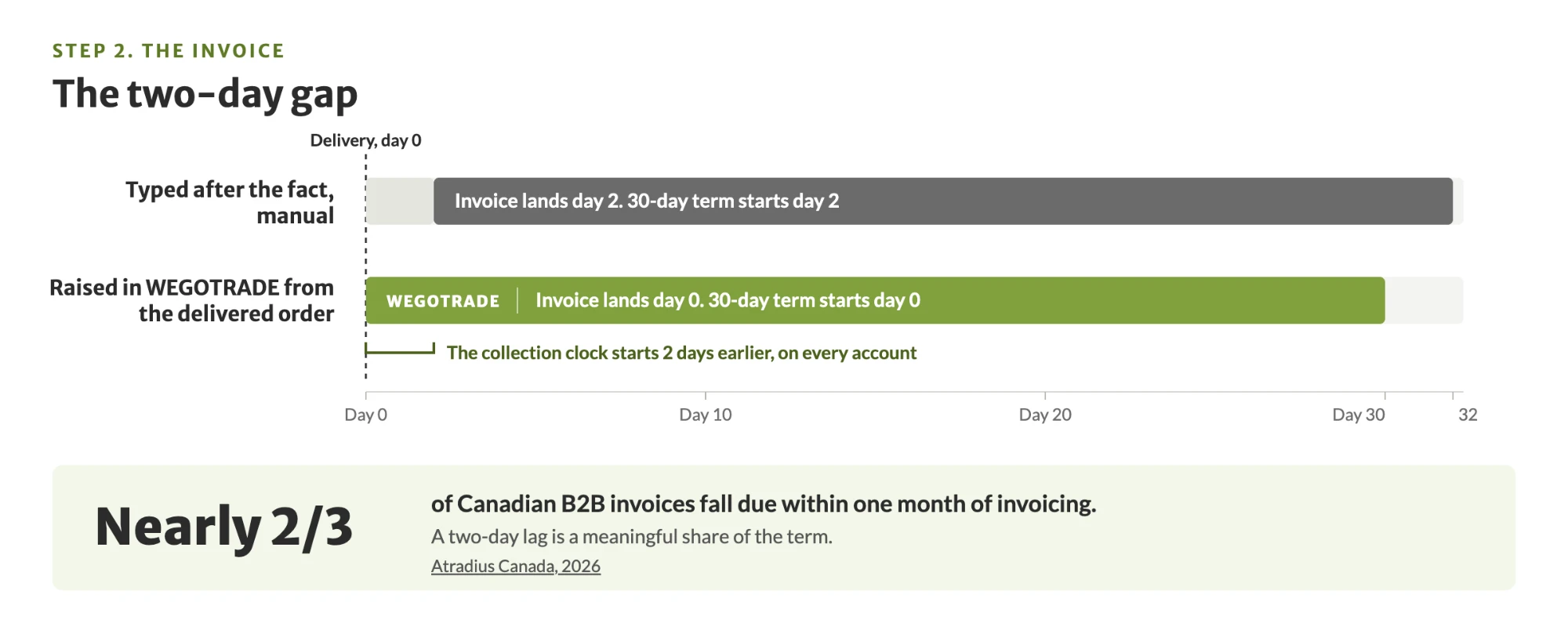
The invoice is where a delivery becomes a receivable, and the delay between the two is pure cost. An invoice raised from the delivered order goes out the same day rather than a day or two later, which pulls the collection clock forward by that much on every account.
Manual today
Typed after the fact, often a day or more later
Paper route sheets, returns settled from memory
Quantity disputes resolved by phone a week later
Pricing errors discovered by the customer, on the invoice
In the extension layer
WEGODeliver carries the route, the returns and the on-site invoice
Digital proof of delivery captured at the door
The invoice is generated from the delivered order, or raised in QuickBooks Online
Returns settled against the delivery record, not from memory
What reaches QuickBooks Online
The invoice, the same day. Invoices raised in QuickBooks Online flow back the other way, so both systems carry the same document whichever one created it.
1,428
hours a year on invoicing, plus delivery adjustments and returns Modeled for a regional distributor at 1,190 orders a month. Full playbook, Section 4, page 12.
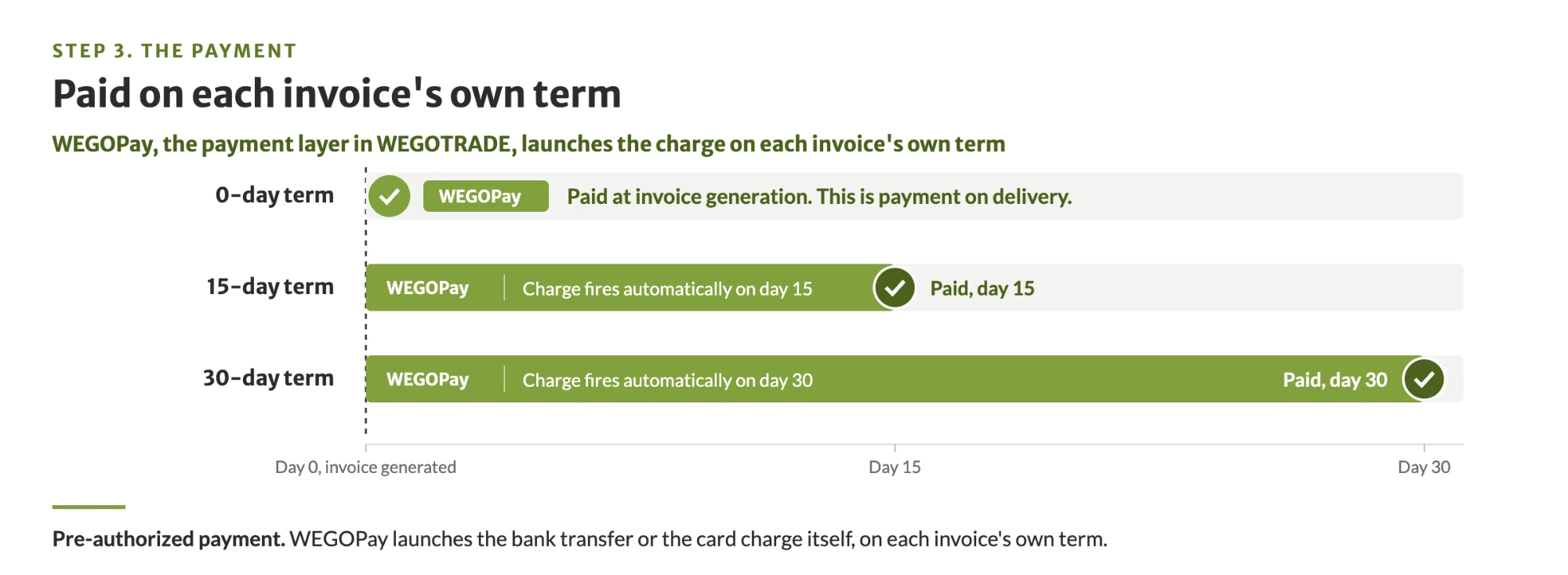
QuickBooks Online already emails an invoice with a payment link, and for a one-off sale that is enough. It stops being enough when the same account reorders twice a week and the order, the delivery and the invoice each live somewhere different, so your B2B customer, your representatives, your drivers and your accounting team each work from a different copy. Carrying order, invoice and payment on one B2B platform gives them one document, and WEGOPay collects on demand or on pre-authorized payment, launching the bank transfer or the card charge on each invoice’s own term.
Manual today
Cheques, and transfers matched by hand
Cash collected at the door and reconciled later
A person chasing an aging report, when there is time
Follow-up that depends on somebody remembering
In the extension layer
Card or bank transfer online, or capture at the door
Pre-authorized payment on each invoice’s own term; a zero-day term is paid at invoice generation, which is how payment on delivery works
Payment reminders and statements of account sent automatically, on invoice age
The payment, matched to its invoice, synchronized in both directions, and the closed invoice in both systems once it settles.
1,666
hours a year on payments, plus accounts receivable follow-up Modeled for a regional distributor at 1,190 orders a month. Full playbook, Section 4, page 12.
This is the part that decides whether the other three steps are worth
anything. QuickBooks Online stays the system of record: the chart of accounts, sales tax,
bank reconciliation and the month-end close are never touched.
What synchronizes with QuickBooks Online
Invoices and payments, in both directions. An invoice raised in QuickBooks Online
appears in WEGOTRADE and an invoice raised from a delivery appears in QuickBooks Online, in
seconds. A payment recorded on either side closes the invoice on both. Your B2B customer sees the
same status you do. Orders are a choice. Depending on your own process, orders can be
integrated to QuickBooks Online or stay in WEGOTRADE.
That is the integration, and it is deliberately narrow, and the
QuickBooks Online integration page sets out exactly what it moves. The connection takes a few
clicks and WEGOTRADE supervises it, so no technical resource is required. WEGOTRADE is listed on the
QuickBooks App Store
in Canada, having passed Intuit’s technical and security review on 17 June 2026.
More than 21,000 food businesses are connected on the
WEGOTRADE marketplace, and the
same order-to-cash layer runs on a distributor’s own branded platform through
white label. Figures in the full playbook
are modeled and labeled as modeled; your own will differ. Intuit and QuickBooks are registered
trademarks of Intuit Inc. Used with permission.
Get the QuickBooks Online overview. Free.
Five pages, one per order-to-cash step: order, invoice, payment, synchronization. Instant access, no charge.