The B2B platform integrated with QuickBooks Online
WEGOTRADE<>
Extend QuickBooks Online into a complete order-to-cash operation.
The order, the invoice and the payment, on top of the system your books already run on.
Intuit reviewed
Technical and security review passed 17 June 2026
Publicly listed
On the QuickBooks App Store in Canada
Bidirectional
Invoices and payments sync both ways
Intuit and QuickBooks are registered trademarks of Intuit Inc. Used with permission.
WEGOTRADE is a Member of the Intuit Developer Program.
EN v1
Prefer to listen
This playbook is also an audio edition.
38 minutes, narrated end to end, including the ten question diagnostic.
Shorter, or offline
Twenty-nine pages is a lot. There is a five-page version.
The overview covers the same order-to-cash cycle in five pages. The PDF is this full edition, to keep or to forward.
After 20 minutes you will be able to put a number on what it costs to run order, invoice and payment by hand, say exactly which parts of the cycle a connected layer would take over, and score your own readiness against ten questions.
Written so the five facts below can be read, quoted or extracted on their own.
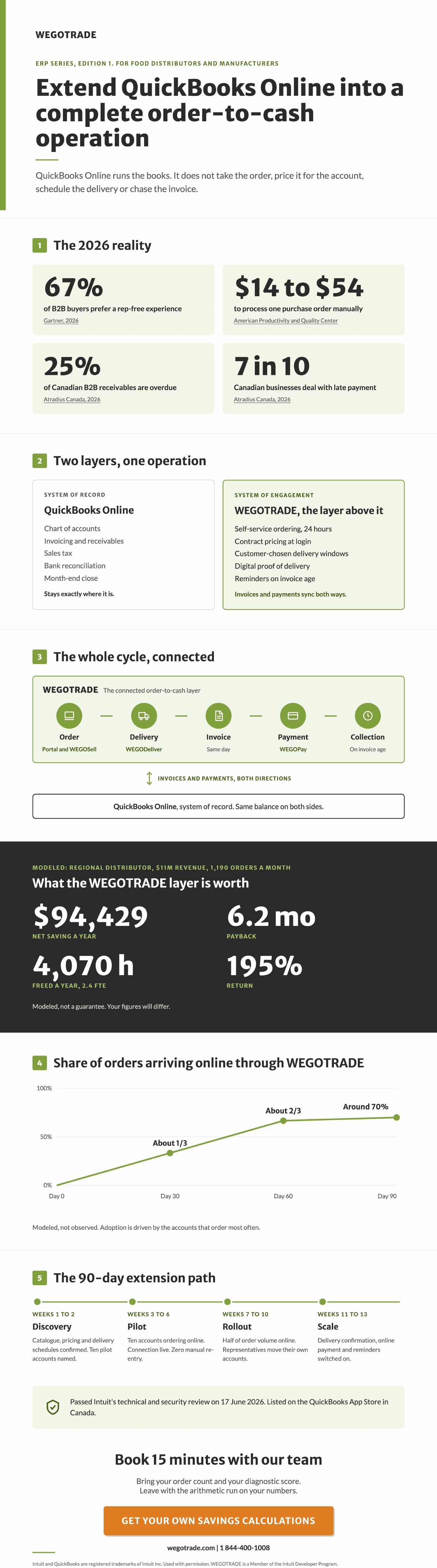
QuickBooks Online is the system of record. It does not take the order, price it for the account, schedule the delivery, or chase the invoice.
A connected business-to-business (B2B) platform adds that layer on top. With QuickBooks Online the integration is transactional: invoices and payments, both of them moving in both directions.
Modeled for a regional distributor at $11M revenue and 1,190 orders a month: 4,070 hours freed, $94,429 net saving a year, 6.2 month payback.
Processing a purchase order manually costs about $14 to more than $54, per the American Productivity and Quality Center. [2] At 14,280 orders a year, the low end alone is roughly $200,000.
67% of B2B buyers now prefer a rep-free experience, per Gartner. [1] In food distribution, where the same accounts reorder several times a week, that preference compounds fast.
01Section
Executive summary
QuickBooks Online runs the books. It does not take the order. Everything between a customer deciding to reorder and the cash landing in the bank happens somewhere else, and in most food distribution businesses that somewhere else is a phone, an inbox and a person retyping.
That gap has a price, and it is measurable. For a regional distributor at $11M in revenue running 1,190 orders a month on QuickBooks Online, the modeled figures are:
$94,429
Net saving a year
6.2
Month payback
195%
Return
Modeled for a regional distributor at $11M revenue, 1,190 orders a month, six drivers, running QuickBooks Online. Your numbers will differ. Section 4 shows you how to run them.
All of it happens without replacing QuickBooks Online. The accounting system stays exactly where it is, the chart of accounts is never rewritten, and the bookkeeper's month-end does not change. What changes is the layer above it, where your B2B customers place their own orders and those orders arrive priced correctly without anyone keying them a second time.
This playbook has nine sections, a self-scoring diagnostic you can complete in five minutes, and one ask at the end. The ask is the diagnostic in Section 8. Score yourself, and bring the score to a 15-minute conversation.
This is written for distributors and manufacturers between roughly $5M and $200M in revenue who took orders by phone and email last week and will again tomorrow. If your customers already place most of their own orders online, most of what follows will confirm what you know. If they do not, Section 4 puts a number on the difference.
What this playbook is not is a case for migrating to an enterprise resource planning system. That decision has its own timeline and its own budget, and nothing here depends on it. The question answered in these pages is narrower and more immediate: what does it cost to keep the order desk manual for another year, and what would it take to stop.
02Section
The 2026 reality for food distributors and manufacturers that run on QuickBooks Online
The bookkeeper
"The accounting system is fine."
Same gap
The customer
"I still have to wait on the phone to place my order."
Two things are true at the same time in most distribution businesses, and they are usually said by two different people. The bookkeeper says the accounting system is fine. The customer says they are still waiting on hold to place an order. Both are right, and they are describing the same gap from opposite ends.
Start with how buying behaviour has already moved. Gartner surveyed 646 B2B buyers between August and September 2025 and found that 67% prefer a rep-free experience, with 45% reporting they used artificial intelligence during a recent purchase. [1] A distributor whose only ordering channel is a person answering a phone is running against two thirds of the people it sells to.
Food distribution makes that sharper than most industries, because the product is perishable. Your B2B customers are not making occasional considered purchases. They reorder constantly, day to day and week to week, and every one of those small recurring orders costs the same to process as a large one.
That frequency is the thing most software written for other industries gets wrong. A distributor serving 300 accounts that each reorder twice a week is processing more than 30,000 transactions a year. The individual order is rarely large, which is precisely why per-order handling cost decides whether the account is profitable. Volume, not value, is the number that matters in this category.
30,000
transactions a year. Volume, not value, is the number that matters in this category.
The category itself is not small and it is not shrinking. Statistics Canada put wholesale sales in the food, beverage and tobacco subsector at $16.4 billion in June 2026, up 2.8% on the month, with the food industry group up 3.1% and the agency attributing the gain to higher volumes rather than to price. [4] Volume growth lands on the order desk first.
Order size is the exception rather than the rule here, but it is worth noting where the rest of the market is heading. Forrester reports that 63% of sales leaders expect digital buying behaviours to have a significant impact on their organization within two years, while only 37% say digitizing the buyer journey is a top priority. [5] That gap between recognition and action is the opening, and it closes as competitors act.
That is where the unit price matters. Benchmarking by the American Productivity and Quality Center puts the cost of processing a single purchase order anywhere from about $14 to more than $54, and the spread is driven by how the work is organized rather than by how many orders arrive. [2] Take the low end and multiply it by your own volume. At 1,190 orders a month, 14,280 orders a year, even the $14 figure is roughly $200,000 of annual processing cost. Run that multiplication on your own order count before reading further.
14,280orders a year, at 1,190 a month×$14the lowest benchmark cost per order=$200,000of annual processing cost
Run the same multiplication on your own order count before reading further. The benchmark runs from about $14 to more than $54 per purchase order, so this is the floor rather than the estimate.
Then there is the cash. Atradius reports that late payment affects about seven in ten Canadian businesses, and that overdue invoices account for about a quarter of business-to-business receivables. [3] Canadian firms are more likely than their regional peers to attribute that late payment to inefficiencies in payment administration and processing rather than to customers who cannot pay. That distinction matters, because a process problem is one you can fix without losing a single account.
The outlook makes the collection question sharper still. More than one in four Canadian companies in the same Atradius survey expect customer insolvency risk to rise. [6] When customers get slower to pay, the distributor whose invoice goes out the day of delivery is in a materially different position from the one whose invoice goes out two days later.
Put the four findings beside each other and they describe one operating position rather than four separate problems. Your customers would rather serve themselves. Every order they cannot serve themselves carries a processing cost you pay. And the invoice that follows it gets paid late often enough to matter, for reasons that sit in process rather than in credit risk.
That is what makes the status quo the expensive option. Doing nothing is not free, it is simply a cost that never appears as a line item, because it is distributed across an administrator's morning, a representative's windscreen time, and an owner's Sunday evening with the aging report.
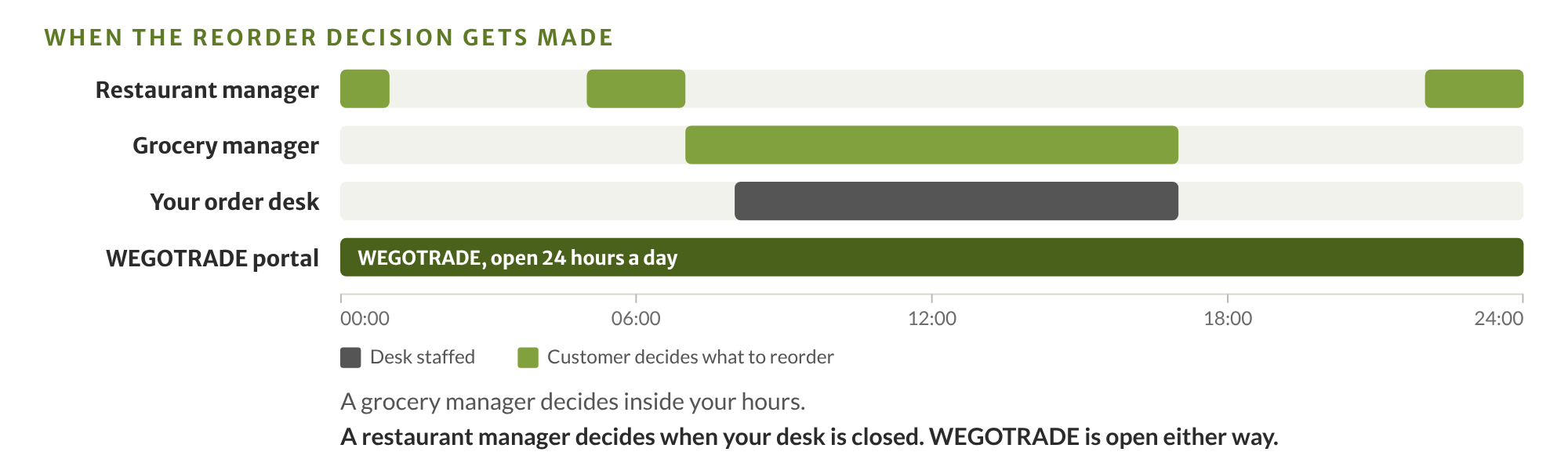
It is worth picturing the transaction from the other side of it. A restaurant manager works out what to reorder between the end of service and the start of prep, which is late at night or very early in the morning. A grocery manager does it on the floor, on a phone, between deliveries. Neither of them is sitting at a desk during your office hours, and neither wants to wait for a callback to find out whether an item is on their contract price. The distributor who is open when that decision gets made captures the order. The one who is not gets a voicemail, or nothing at all.
The 2026 reality
Four numbers, one operating position
67%
Prefer a rep-free experience
Gartner, 2026
$14 to $54
To process one purchase order manually
American Productivity and Quality Center
7 in 10
Canadian businesses deal with late payment
Atradius Canada, 2026
25%
Of Canadian B2B receivables are overdue
Atradius Canada, 2026
None of this is the accounting system's fault. QuickBooks Online was built to be the financial record, and it is good at being the financial record. What the numbers above describe is a missing layer between your customers and your books. Section 3 defines exactly where that layer starts.
03Section
What does QuickBooks Online not do for a food distributor?
It does not take the order, price it for that specific account, schedule its delivery, prove the delivery happened, or chase the invoice afterwards. It records the financial result of all of those things once someone else has done them.
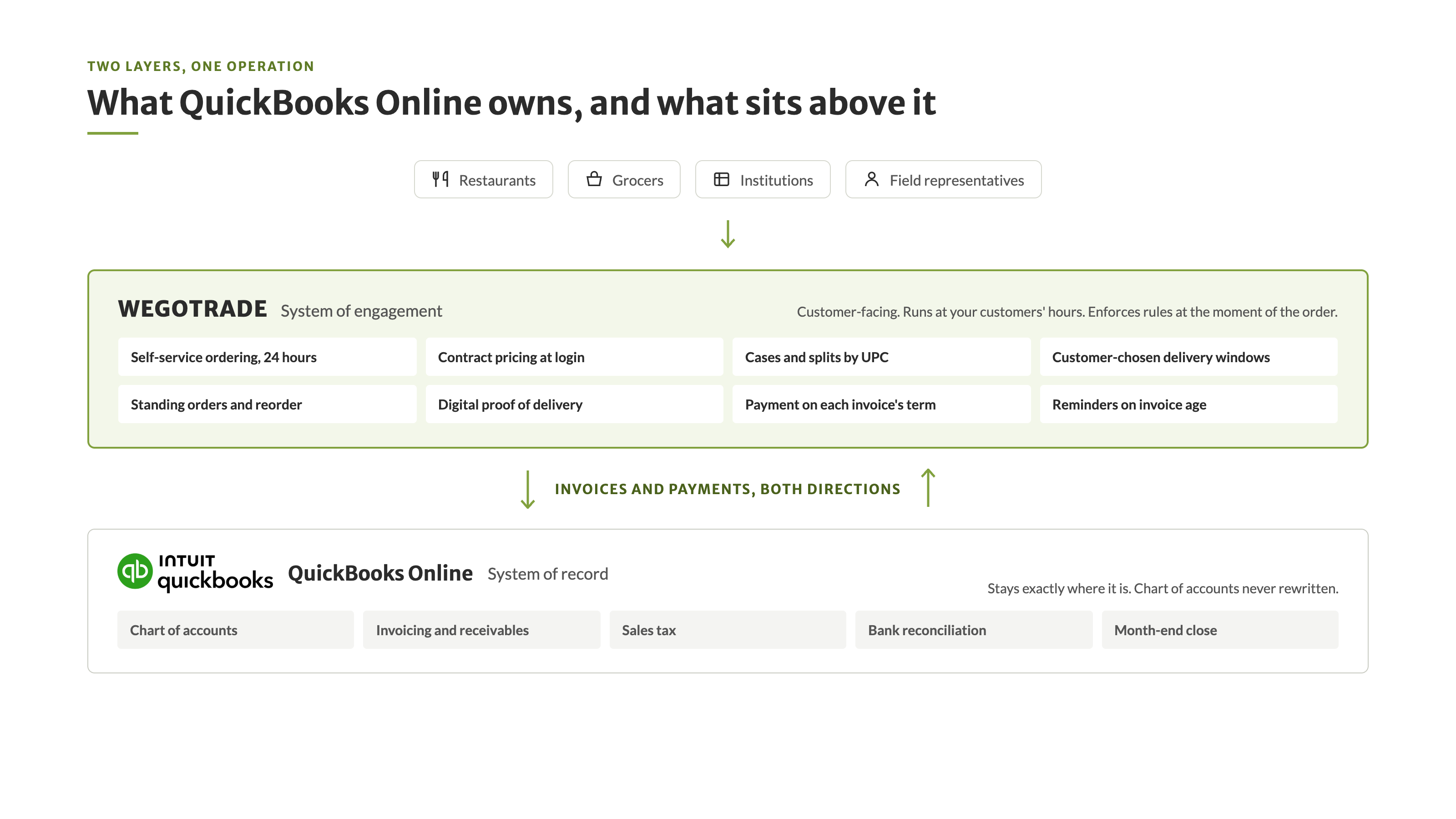
That is worth saying generously, because the system is not the problem. QuickBooks Online owns the chart of accounts, invoicing, receivables, sales tax, bank reconciliation and the month-end close, and it does that work reliably for tens of thousands of Canadian businesses. A bookkeeper who tells you it is fine is telling the truth about the job it was built for.
Ask the person who keeps your books what they need and the list is short and unglamorous. Accounts that reconcile. Sales tax that files correctly. A close that happens on time. Receivables they can age and report on. An audit trail that holds. QuickBooks Online delivers all of that, which is why replacing it to solve an ordering problem is the wrong trade, and why the rest of this document never proposes it.
The work that sits above it is a different job with a different shape. It is customer-facing, it runs at your customers' hours rather than yours, and it has to enforce commercial rules at the moment of the order instead of correcting them afterwards on an invoice.
That last distinction carries more weight than it first appears. Pricing corrected on an invoice has already cost you twice: once when someone investigated it, and again when the customer saw a number they did not expect. Pricing enforced at login never becomes an exception at all. The same logic applies to minimum order quantities, pack configurations and delivery windows. Every rule applied at order entry is a rule nobody has to repair downstream. The same shift applies to the reminder itself. A platform that tells a customer they have two hours left to order for tomorrow's delivery removes the call that a customer service agent or a representative would otherwise place, account by account, before every delivery. The reminder is the cheapest part of the cycle to automate and one of the most expensive to keep doing by hand.
2×
Pricing corrected on an invoice has already cost you twice. Once when someone investigated it, and again when the customer saw a number they did not expect. Pricing enforced at login never becomes an exception at all.
When the two layers are not connected, the gap gets filled by a person, and that person becomes the integration. They read an order out of an inbox and type it into the accounting system. They know which account gets which price because they remember. They know the Tuesday route cannot take a late addition because they have been here eleven years. That works until they are on holiday, and it caps the business at the number of orders one experienced person can process in a morning.
When you evaluate any layer of this kind, three questions separate the ones built for food distribution from the ones adapted to it. Does it apply per-account contract pricing at login, before the order exists? Does it handle cases, splits and pack configuration by Universal Product Code? And does it write to your accounting system in both directions, or only push one way? A one-way push leaves you reconciling invoices and payments by hand, which is most of the work you were trying to remove.
That layer covers the whole order-to-cash cycle, not ordering alone. Nine things belong to it:
Buyer self-service ordering, from a portal or a mobile application, at any hour.
Mobile order entry for field representatives against the same catalogue.
Per-account contract pricing applied at login, before the order is placed.
Delivery window selection by the customer.
Standing orders and one-click reorder. Separately, automatic order generation from those standing orders, one per delivery day, which is what actually automates recurring perishable buying.
Automatic order reminders, including a cut-off notice that tells the customer how long is left to order for their next delivery.
Digital proof of delivery.
Invoices and payments synchronizing in both directions with the accounting system, whichever side the transaction starts on.
A payment handed to a driver or arriving by mail recorded in WEGOTRADE and posted to QuickBooks Online, and a payment made online through WEGOPay posted the same way, so what your B2B customer sees is exactly what you see.
Payment collected automatically on each invoice's own term, including a 0 day term for payment on delivery, and collection reminders driven by invoice age rather than by someone remembering.
Set the two layers side by side and the boundary is obvious. The comparison below is between two layers of one operation. It is not a comparison between two vendors.
Capability
System of record: QuickBooks Online
System of engagement: the layer above it
Chart of accounts, sales tax, reconciliation, month-end close
Yes, and this is where it belongs
Never touched
Customer self-service ordering, 24 hours a day
Not designed for it
Yes, portal and mobile application
Per-account contract pricing enforced at order entry
Limited
Yes, applied at login before the order exists
Cases, splits and pack configuration by Universal Product Code
Not designed for it
Yes, at catalogue level
Delivery windows chosen by the customer
Not designed for it
Yes
Standing orders and one-click reorder
Not designed for it
Yes
Digital proof of delivery
Not designed for it
Yes, captured at the door
Invoice and payment synchronization
Holds the record
Yes, and in both directions, so your B2B customer sees the same status you do
Collection reminders on invoice age, and payment collected on each invoice's own term
Basic
Yes
There is one more thing worth knowing before you evaluate any layer of this kind, and it is the question every finance lead asks first. Will connecting something to the accounting system put the books at risk?
WEGOTRADE passed Intuit's technical and security review on 17 June 2026 and is listed on the QuickBooks App Store in Canada. That review is Intuit's, not ours, and it is the reason this section can make a claim about safety without asking you to take our word for it. WEGOTRADE is a Member of the Intuit Developer Program.
04Section
Where hours and margin disappear
This section turns the gap into one number you can check. It is built on a modeled operator, not on an average, so you can see every assumption and replace it with your own.
The model is a regional distributor: $11M in annual revenue, 1,190 orders a month, six delivery drivers, running QuickBooks Online. Everything below is calculated from that profile. It is a model, and the point of showing the arithmetic is so you can run it on your own order count instead of trusting ours.
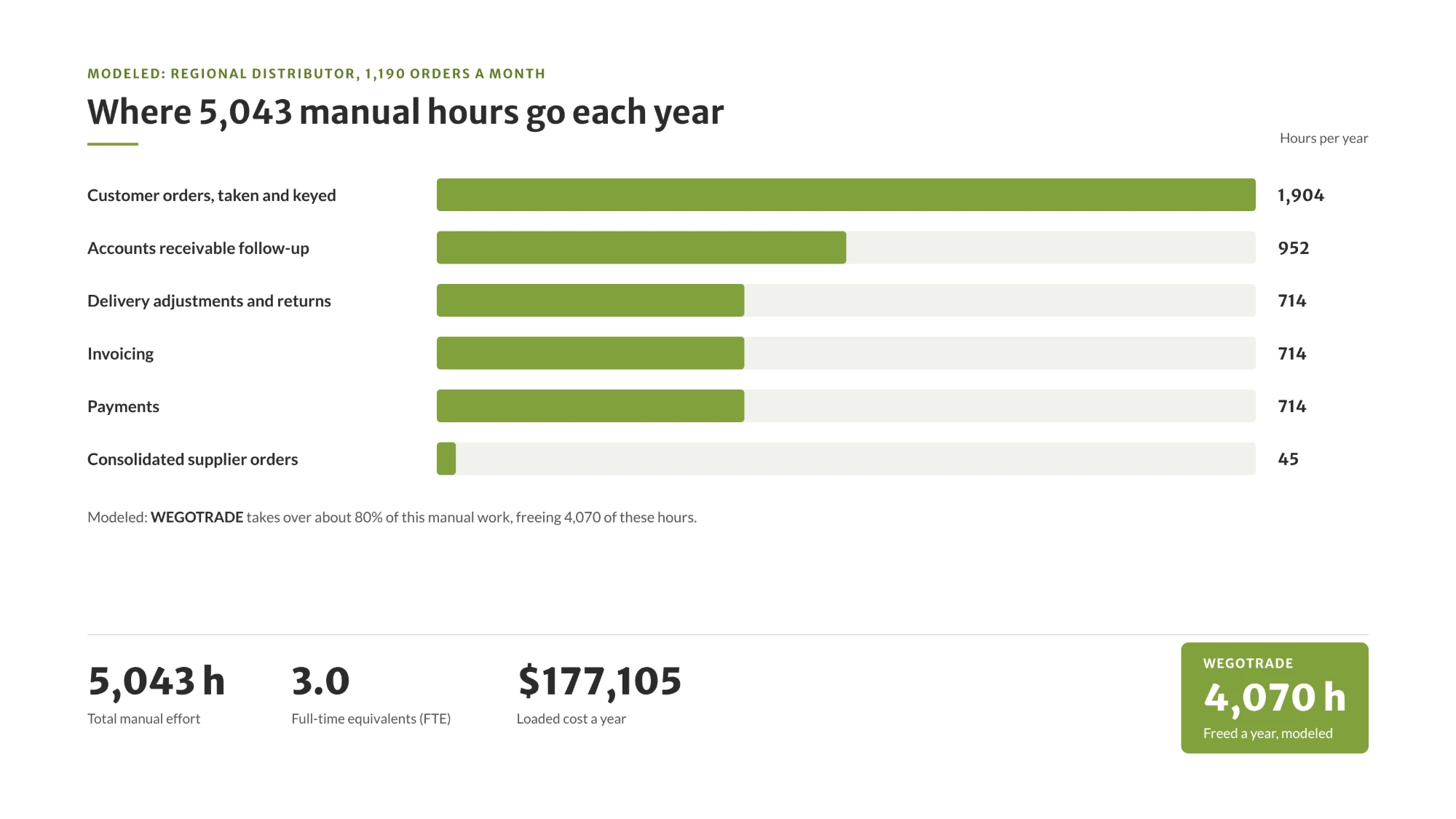
Here is where the hours sit across a year.
Those six lines are worth reading slowly, because most of them are invisible in a profit and loss statement. Order intake and keying is the obvious one. Delivery adjustments are the returns and shortages settled after the fact. Invoicing is the gap between a delivery happening and a document going out. Payments is the manual matching of a transfer or a cheque to an open invoice. Receivable follow-up is the chasing. None of these appear as a cost centre, and all of them are salaried time.
To run this on your own operation, you need four numbers and about twenty minutes: your monthly order count, the average minutes spent per order across intake and keying, your fully loaded hourly cost for the staff doing it, and your current share of orders that arrive without a phone call. Multiply, then compare the result with the per-order benchmark below. If the two land close together, you have a defensible figure. If they diverge sharply, one of your assumptions is wrong and it is worth finding out which.
Run it on your own numbers
If you would rather not run it yourself, we will run it with you. Book 15 minutes with our team, bring those four numbers, and we will build the scenario on your own volumes before you commit to anything.
Connecting the ordering layer to the accounting layer does not remove all of that work. It removes the part that exists only because the two systems do not speak. Assuming 80% automation across those activities, and that assumption is stated here rather than buried in a footnote, the model frees 4,070 hours a year, which is 2.4 full-time equivalents, and recovers about $142,938 of administrative cost. Net of platform cost, the first-year saving is $94,429.
Now the cross-check, because one method producing one number is a claim, and two independent methods producing the same number is evidence.
Two ways to the same number
1,190 orders a month is 14,280 orders a year. The modeled effort of $177,105 divided by 14,280 orders is $12.40 per order. The American Productivity and Quality Center benchmark for processing one purchase order runs from about $14 to more than $54. [2] The bottom-up model lands just under the published floor, which means it is conservative, not optimistic.
The result for this operator: $94,429 saved a year, a 6.2 month payback, and a 195% return. Savings first, because that is the figure that pays for the decision. The return is what tells you the ratio holds.
$94,429
Net saving a year
6.2 months
Payback
195%
Return
Your operation is probably not the model. Find the row closest to your own size below, then run your real numbers in the calculator. All five documented ROI scenarios are published with their inputs, and the full scenario for the regional distributor shows every line of this arithmetic.
Scenario
Orders per month
Revenue
Accounting or enterprise resource planning system
Hours freed
Net saving a year
Payback
Independent distributor
430
$4M
QuickBooks Online
1,494
$31,668
7.9 months
Regional distributor, the model in this playbook
1,190
$11M
QuickBooks Online
4,070
$94,429
6.2 months
Mid-size distributor
2,975
$27M
Business Central
9,181
$228,299
4.8 months
Large account, no direct store delivery
10,700
$96M
SAP S/4HANA
17,548
$467,150
4.0 months
Large food processor
21,400
$193M
SAP S/4HANA
35,096
$950,248
5.2 months
Two of the five scenarios run on QuickBooks Online, which is the point of this edition. The others are here so you can see that the ratio holds as volume grows, even though the dollar total does not transfer.
What the model deliberately leaves out is as important as what it counts. It does not price the orders you never received because a customer could not reach anyone at 6 a.m. It does not price the credit notes issued for pricing errors, or the margin lost when a rush delivery is arranged by phone. It does not count the cost of an account that quietly moved half its volume to a competitor whose portal was open. Those are real and they are excluded, which is another way of saying the figure above is a floor rather than a ceiling.
The assumption most worth testing is the automation rate. At 80% the model frees 4,070 hours. Run it at 60%, which is a reasonable figure for an operation that keeps a meaningful share of accounts on the phone, and it frees roughly 3,000 hours instead, with the saving and the payback moving in proportion. The ratio survives the change even though the total does not, and that is the useful property: the case does not depend on hitting a best-case adoption number in the first year.
05Section
How do you run B2B order-to-cash on top of QuickBooks Online?
You add a layer that carries the whole cycle, from the order through the invoice to the payment, and connect it to QuickBooks Online with a native integration, so the order is priced correctly the moment it is placed and invoices and payments stay identical on both sides. QuickBooks Online remains the system of record throughout, and the chart of accounts is never rewritten.
Start with the connection, because it is the first objection anyone technical will raise, and because being precise about it is more persuasive than claiming everything.
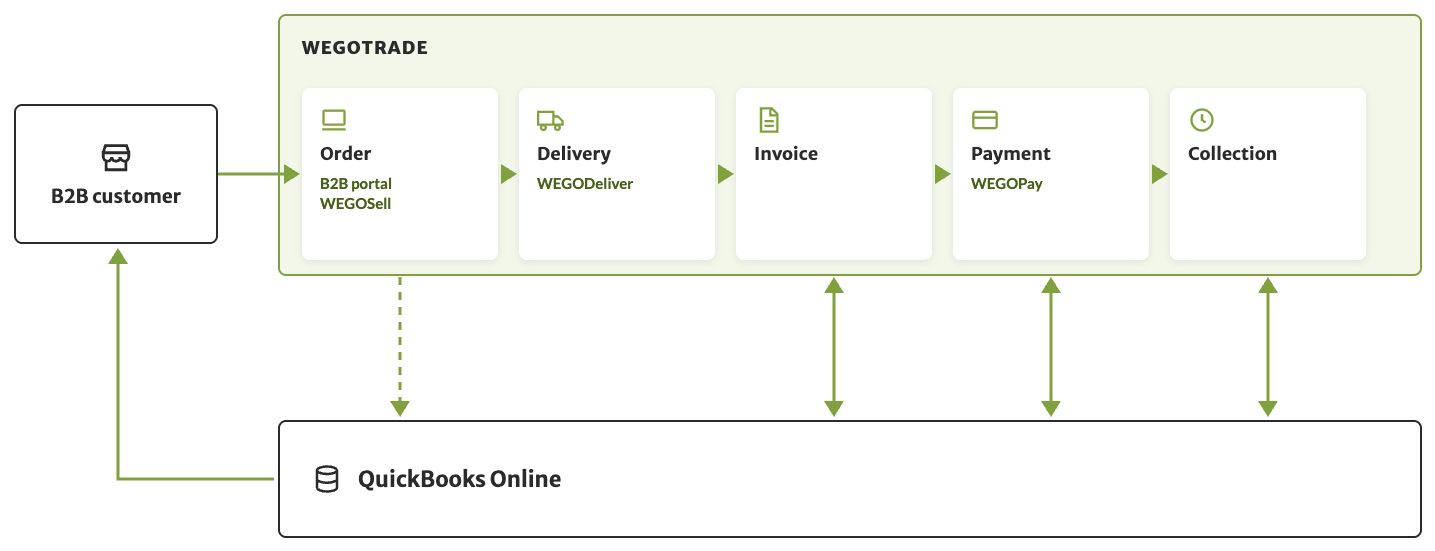
With QuickBooks Online the integration is transactional. Invoices and payments move between the two systems, both of them in both directions. The connector is native, activating it needs no development work on your side, and you can read how the connection is made before you talk to anyone.
Both directions is the part worth slowing down on. An invoice raised in QuickBooks Online appears in WEGOTRADE, which matters for any distributor that does not run a delivery application and invoices from the office. A payment recorded on either side closes the invoice on both. The practical result is that your B2B customers always see the same balance you see, and nobody has to reconcile two versions of an account before answering a phone call.
Here is the whole cycle, stage by stage, so no part of it is left looking manual.
Order-to-cash stage
Manual today
In WEGOTRADE
How it syncs with QuickBooks Online
Customer places the order
Phone, email, text, or a representative writing it down
Portal or mobile application, 24 hours a day, contract pricing applied at login
The order is captured once in WEGOTRADE, priced correctly, with no retyping. Depending on your process, orders can be integrated to QuickBooks Online or stay in WEGOTRADE
Representative places an order at the account
Paper or text, keyed in later
WEGOSell, same catalogue and pricing rules, client history on screen
Captured once, by the same path as a self-served order
Delivery and returns
Paper route sheets, returns settled from memory
WEGODeliver: route, returns, on-site invoice, digital proof of delivery
The delivery record, and the invoice at the moment of delivery
Invoicing
Typed after the fact, often a day or more later
Generated from the delivered order, or raised in QuickBooks Online
The invoice, same day, and invoices raised in QuickBooks Online flow back
Payment
Cheques, transfers matched by hand, cash at the door
WEGOPay online, card or bank transfer, or capture at the door
The payment, matched to its invoice, synced both ways
Collection
A person chasing an aging report
Reminders sequenced on invoice age
The closed invoice, in both systems
WEGOSell, WEGODeliver handles delivery, WEGOPay handles payment, and invoices, payments and collection synchronize with QuickBooks Online in both directions"/>Invoices and payments cross in both directions. Whether the order itself is integrated depends on your own process.
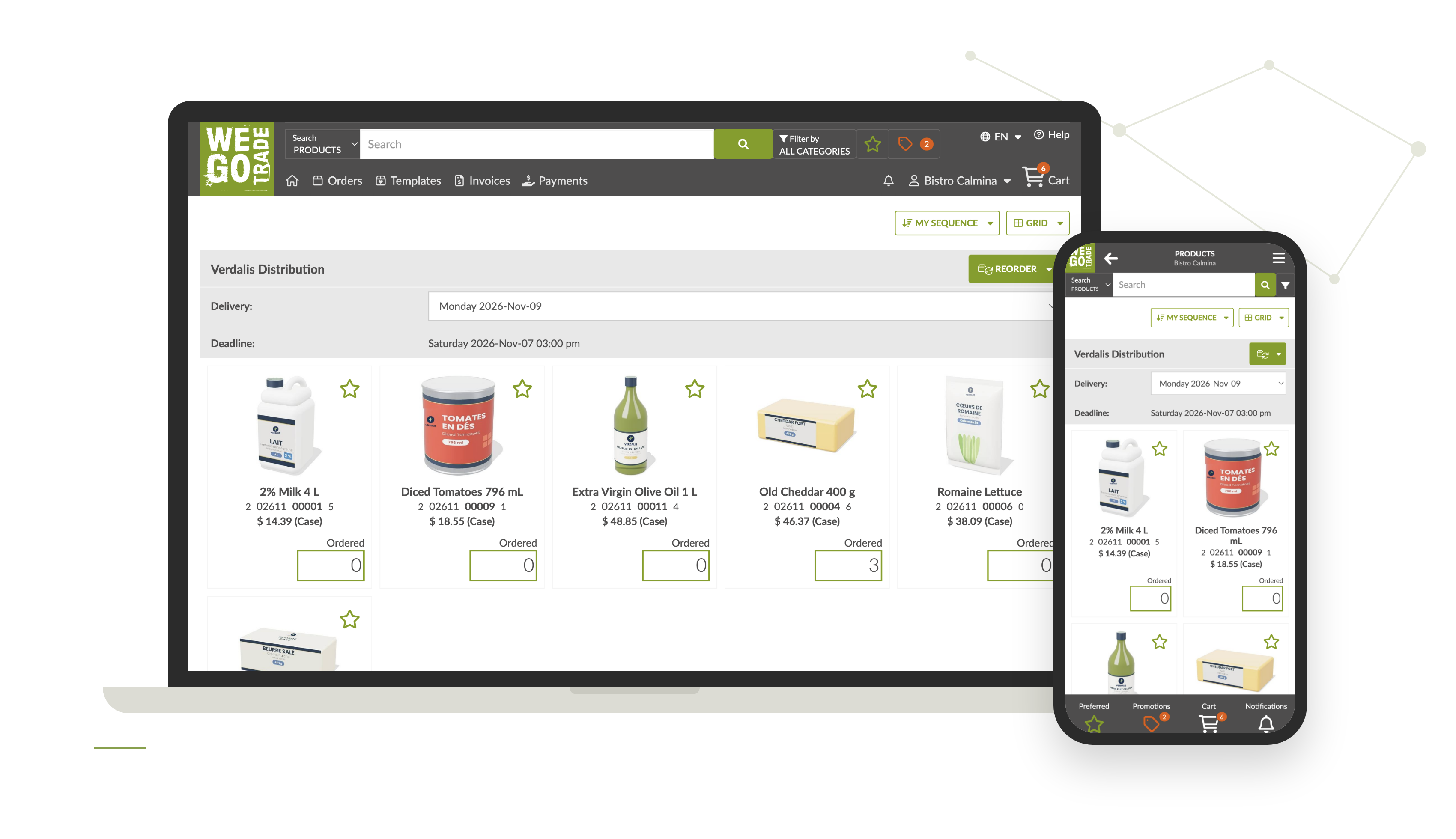
Order capture is the thesis of the whole model, so it gets the most room. Your B2B customers log in and place their own orders at whatever hour suits their operation, which for a restaurant or a grocer is rarely your office hours. They see their own contract pricing, their own delivery schedule, their order history, standing orders and one-click reorder. For perishable categories where the same account reorders several times a week, one-click reorder is not a convenience feature. It is the whole difference between a call and no call.
Field coverage runs on the same rules. WEGOSell puts the same catalogue and the same per-account pricing in the hands of your representatives at the account, with real-time client history covering orders, invoices, payments and statement of account, plus order recommendations. It is a supporting channel for accounts that want a visit, never a replacement for self-service.
Delivery is where invoices get won or lost. WEGODeliver carries the route, return management, on-site invoice creation and centralized digital proof of delivery. A timestamped proof is what stops a disputed drop from aging quietly into a collection problem six weeks later. An invoice reaches your customer by one of two paths: generated in QuickBooks Online and transmitted to WEGOTRADE, or generated by WEGODeliver at the delivery itself.
QuickBooks Online already emails an invoice with a payment link, and for a one-off sale that settles it. The gain here is not another way to pay. It is that the order, the delivery, the invoice and the payment are carried by one platform, so your B2B customer, your representatives, your drivers and your accounting team all read the same document instead of four copies of it. Payment closes the loop, and it works two ways. Your B2B customers can pay on demand, or on pre-authorized payment, where WEGOPay launches the bank transfer or the credit card charge itself on each invoice's own payment term. A term of zero days means the invoice is paid the moment it is generated, which is how payment on delivery works in practice. The fee is a fixed amount per transaction rather than a percentage of the sale, and the seller pays it.
Collection then runs itself. Reminders fire on invoice age instead of on someone remembering to look, which is where the reduction in late payment comes from.
Scope differs from one accounting system to another. If you run something other than QuickBooks Online, check that system's own integration page, because the connectors are not identical.
What stays authoritative in QuickBooks Online
The chart of accounts. The financial record of every invoice and payment. Sales tax. Reconciliation and month-end close. None of it is rewritten, moved or duplicated.
One more thing distinguishes this from installing software. The same platform runs the WEGOTRADE marketplace, where more than 21,000 businesses already trade, so a distributor connecting to it is joining a network rather than launching an empty site and hoping customers arrive. If you would rather your customers saw only your brand, the same platform runs as a white label, with your name and your own customer applications on both app stores. Both are available, and the choice is yours.
What does not change is worth repeating. QuickBooks Online stays the system of record, the chart of accounts is untouched, and nothing is replaced.
06Section
What good looks like, modeled
This section is a model, not a customer case. Every figure in it is calculated from the Section 4 profile, and it is labeled as modeled wherever it appears. Where something is real rather than modeled, it is marked as such and fenced off, so you always know which one you are reading.
The modeled operator: a regional distributor in Canada, $11M in revenue, selling to independent grocers, restaurants and convenience stores, six drivers on direct store delivery routes, running QuickBooks Online with a two-person office.
Before state, in operational detail and without adjectives. Orders arrive by phone and email through the morning. One administrator keys them into QuickBooks Online. Pricing exceptions are caught on the invoice rather than at the order, so credits follow. Drivers return with marked-up route sheets that someone reconciles the next day. Invoices go out a day or two after delivery. The owner reviews the aging report on Sunday evening and sends the reminders personally.
The shape of that day matters more than the totals. The order desk is busiest exactly when the warehouse needs picking instructions, so the two compete. Anything arriving after the cut-off is handled by exception, which means by whoever is closest. Nobody in the building can answer what a given account owes without opening two screens, so the question gets deferred and the balance goes stale.
What changes, and in what order, maps to the four phases in Section 7. Catalogue and per-account pricing are loaded first. The connection to QuickBooks Online is activated. Ten friendly accounts go on the portal. Representatives move their own accounts across. Delivery confirmation and payment switch on last, once ordering volume has proven itself.
Adoption here means the share of your order volume that arrives online rather than by phone, email or text. It is the metric that predicts every other result, which is why it gets the chart rather than the savings number. Modeled adoption for this operator reaches roughly a third of order volume online at 30 days, two thirds at 60, and around 70% by 90 days, driven by the accounts that order most frequently rather than by the largest accounts.
Share of order volume arriving online. Modeled, not observed.
The curve is shaped by frequency rather than by account size, which is the part most rollout plans get backwards. An account ordering twice a week forms the habit inside a fortnight. An account ordering monthly needs three cycles to reach the same place. Sequencing the rollout by order frequency rather than by revenue is what produces a steep first 30 days, and a steep first 30 days is what persuades the representatives who were sceptical.
The results follow from the Section 4 arithmetic: 4,070 hours freed, 2.4 full-time equivalents of capacity, and $94,429 net a year. Capacity matters more than headcount here. In the model the administrator stops keying orders and starts handling exceptions and account development, which is the redeployment most operators actually want.
Two secondary movements come with it, and both are worth watching because they show up before the savings do. Invoices go out the same day as the delivery rather than a day or two later, which pulls the entire collection clock forward by the same amount for every account. And because reminders fire on invoice age automatically, the follow-up that used to depend on someone having time on a Sunday happens on a Tuesday whether anyone is thinking about it or not. Neither is dramatic on a single invoice. Across a year of recurring orders, they are most of the cash-flow difference.
What is modeled and what is not
Modeled: the adoption curve, the hours, the savings, the payback, the operator profile. Real and independently verifiable: Intuit's technical and security review, passed 17 June 2026, and the WEGOTRADE listing on the QuickBooks App Store. Real and published: the customer statements quoted below.
The proof that is not modeled starts with the review. WEGOTRADE passed Intuit's technical and security review on 17 June 2026 and is listed on the QuickBooks App Store in Canada. Intuit ran that review, which is exactly why it is worth more here than anything we could assert.
Two published customer statements speak to this integration directly. An Operations Director at a regional distributor: "Integrating WEGOTRADE with QuickBooks Online completely transformed our order-to-invoice workflow. We now process orders 60% faster with fewer errors, and our customers love getting real-time updates." A VP of Finance at a mid-sized food and beverage supplier: "The WEGOTRADE and QuickBooks integration gave us complete visibility across invoices and payments. Our cash flow improved, and our teams now work from one unified, connected system." Both are customer statements, including the 60% figure, and are quoted as published on the QuickBooks Online integration page.
What is hard, honestly. Adoption is the work. Loading a catalogue and activating a connector is a matter of weeks, but moving 200 accounts that have ordered by phone for fifteen years takes deliberate effort from the people those accounts already trust. WEGOTRADE carries most of that work: automatic invitations to your customers, a vendor landing page they arrive on, follow-up to the accounts that have not ordered yet, and conversion tracking so you can see which accounts have moved and which still need a call. The distributors who reach 70% online pair those tools with representatives walking their own customers through a first order, rather than sending an announcement. The ones who stall are the ones who treated it as a software launch.
07Section
The 90-day extension path
Ninety days is the realistic window for a native connection to QuickBooks Online. It is shorter than an enterprise migration because nothing is being migrated. Each phase below carries an owner and an exit criterion, because a timeline without exit criteria is a wish.
Weeks 1 to 2
Discovery
Your operations lead with WEGOTRADE
Catalogue, per-account pricing and delivery schedules confirmed, and the ten pilot accounts named
Weeks 3 to 6
Pilot
Your operations lead
Ten accounts placing real orders online, connection to QuickBooks Online live, zero manual re-entry for those accounts
Weeks 7 to 10
Rollout
Your sales lead
Half of order volume arriving online, representatives moving their own accounts
Weeks 11 to 13
Scale
Your sales and finance leads
Delivery confirmation and online payment switched on, collection reminders running
Division of labour, stated honestly, because whoever looks after your systems will estimate it anyway and will trust the document that got there first. Your team ends up running the platform. WEGOTRADE sets it up alongside you, loads the first catalogue and pricing and activates the connection, then trains your people so that every configuration change, catalogue update and pricing revision afterwards is yours to make, without waiting on us. You supply the catalogue and the pricing rules and name the pilot accounts. Bringing customers across is largely automated: WEGOTRADE sends the invitations, hosts the vendor landing page they land on, chases the accounts that have not ordered, and reports conversion by account, so your representatives spend their time on the accounts that actually need a conversation. The heaviest internal task is not technical. It is confirming that your per-account pricing is actually what you think it is, which is a useful exercise regardless of what you decide about the platform.
What each role should expect:
Whoever owns the accounting file: the connection takes a few clicks and WEGOTRADE supervises it. There is no development, no technical resource required, and no change to the chart of accounts.
Sales director: representatives keep their accounts and stop taking dictation. WEGOSell gives them history and recommendations at the account, and the conversion report shows them which of their customers have moved online and which have not.
Customer service team: the morning shifts from keying orders to handling exceptions. The queue tells them who still has to order today, who is drifting later than their usual pattern, and who has passed the cut-off for the next delivery, so the calls they make are the ones that change an outcome. This is the group whose daily work changes most, so involve them in the pilot rather than announcing it to them.
Drivers: proof of delivery, with invoices and payment capture at the door if you run that step.
The customer-side script is where adoption is actually won, and WEGOTRADE gives your team the tools to run it. Share catalogues with the accounts you choose, send invitations, track which customers have engaged, and follow up with the ones who have not. A landing page built for your customers makes the invitation easier to accept. WEGOTRADE brings the best practices from operators who have already done this and stays alongside your team through the rollout.
Two failure modes are worth naming in advance, because both are recoverable if you see them early. The first is a catalogue that is not ready: pack sizes that do not match what customers actually order, or per-account pricing that lives in someone's head rather than in a table. That surfaces in week one of the pilot and it is the single most common reason a rollout slips. The second is a representative who quietly keeps taking orders by phone because it feels faster to them. That one is a compensation and coaching question, not a software question, and it is worth settling before the pilot rather than during the rollout.
Throughout, nothing is replaced. QuickBooks Online stays the system of record, the chart of accounts is untouched, and no historical data is migrated.
What happens after day 90 matters as much as the first quarter. The accounts still ordering by phone at that point are rarely the resistant ones; they are usually the ones nobody has walked through a first order yet. Working that list deliberately, a handful of accounts a week, is what takes an operation from half its volume online to the 70% range.
08Section
The 10-question order-to-cash diagnostic
Score each question from 0 to 3, where 0 is never and 3 is always. Thirty points is the maximum. Five minutes, and the result tells you which part of the cycle is capping the rest.
Score it honestly rather than aspirationally, and score the operation you ran last week rather than the one you intend to run. If two people in the business would answer a question differently, that disagreement is itself the finding, and it usually points at a step nobody owns. The most useful version of this exercise is done separately by the person who takes orders, the person who invoices, and the person who chases payment, then compared.
#
Question
Score 0 to 3
1
Do your B2B customers place their orders themselves, without contacting anyone?
2
Does every invoice and payment reach QuickBooks Online without anyone retyping it?
3
Is per-account contract pricing applied at the order, rather than corrected on the invoice?
4
Do customers choose their own delivery window when they order?
5
Is proof of delivery captured digitally and linked to the invoice?
6
Does the invoice go out the same day as the delivery?
7
Can your B2B customers pay online, does that payment post back automatically, and can it be collected on each invoice's own term, including payment on delivery?
8
Does anything reach QuickBooks Online by someone retyping it from another screen? Score in reverse: 3 means nothing does
9
Can a B2B customer see the products available to them, their own contract price and their balance, without contacting you?
10
Are payment reminders and statements of account sent automatically, rather than when someone remembers?
Total
out of 30
Your score
0 to 10
Manual-bound
Ordering is the constraint, and every other improvement is capped by it. Start with self-service ordering for your twenty most frequent accounts.
11 to 20
Partially connected
Ordering works, but the cycle breaks after the order. Look at delivery confirmation and invoice timing.
21 to 30
Optimizing
The cycle runs. The remaining gain is in collection timing and in the accounts still ordering by phone. Bring the scorecard to a 15-minute review and work the last mile.
Every band has a next step, including the top one. A distributor scoring 28 still has something worth 15 minutes, because the last three points are usually the collection cycle, and that is cash rather than effort.
All external figures in this playbook link inline to their primary source. Gartner, March 2026. American Productivity and Quality Center, April 2026. Atradius, September 2026. Statistics Canada, August 2026. Forrester, citing its own B2B Sales Survey, 2023. Each was verified against the primary source on 2 November 2026. WEGOTRADE operating figures are modeled from the documented regional distributor scenario: a model, not a guarantee, and your own figures will differ.
09Section
Next step
Get the detailed calculation of your own savings. Book 15 minutes, bring your order count and your scorecard, and you will leave with the arithmetic run on your numbers instead of the model in Section 4.
What happens in those 15 minutes:
We count the hours your team currently spends on work the connection would absorb.
We show what the connection to your QuickBooks Online setup actually touches, and what it does not.
You get a savings range and a payback window for your own order volume.
Nothing to install first, and no obligation at the end of it. If the arithmetic does not work for your volume, we will tell you that in the meeting rather than three months later.
Jacques Dulac, Chief Executive Officer, WEGOTRADE. wegotrade.com. 1 844-400-1008. info@wegotrade.com.
Frequently asked questions
These seven questions are the FAQPage schema source for the landing page. Question for question, answer for answer.
Does this replace QuickBooks Online?
No. The platform sits on top and synchronizes with it. QuickBooks Online stays the system of record, and the chart of accounts is never rewritten.
Does WEGOTRADE work with every version of QuickBooks?
Integration is available with QuickBooks Online. For QuickBooks Desktop, contact us to discuss a custom integration.
Which processes are automated?
Invoices and payments. Both synchronize in both directions, so an invoice raised on either side appears on the other and a payment recorded on either side closes it on both.
Does the integration require development work?
No. The connector for QuickBooks Online is native and is activated with support from our team.
How long does it take to go live?
Plan on 90 days end to end, with a pilot of ten accounts ordering online inside the first six weeks. Section 7 sets out the four phases, each with an owner and an exit criterion.
What does the payment fee cost?
WEGOPay charges a fixed fee per transaction rather than a percentage of the sale, and the seller pays it. Exact figures depend on volume and configuration and come from the sales team.
Is WEGOTRADE listed on the QuickBooks App Store?
Yes, in Canada. WEGOTRADE passed Intuit's technical and security review on 17 June 2026 and is a Member of the Intuit Developer Program.
Every figure in this edition on a single sheet. Built to be forwarded to the
people who will not read twenty pages.
Click to open the full sheet
The full-size sheet is the last page of this PDF. It carries the same five numbers,
the same two-layer split and the same 90-day path, with nothing added that is not already
argued here.
The 2026 reality in four analyst figures
System of record against system of engagement, side by side
The whole order-to-cash cycle, stage by stage
What the connected layer is worth, modeled
The 90-day path in four phases
Send it to a finance lead or an operations lead who needs the argument before the
meeting, not after it.


 WEGOSell,